

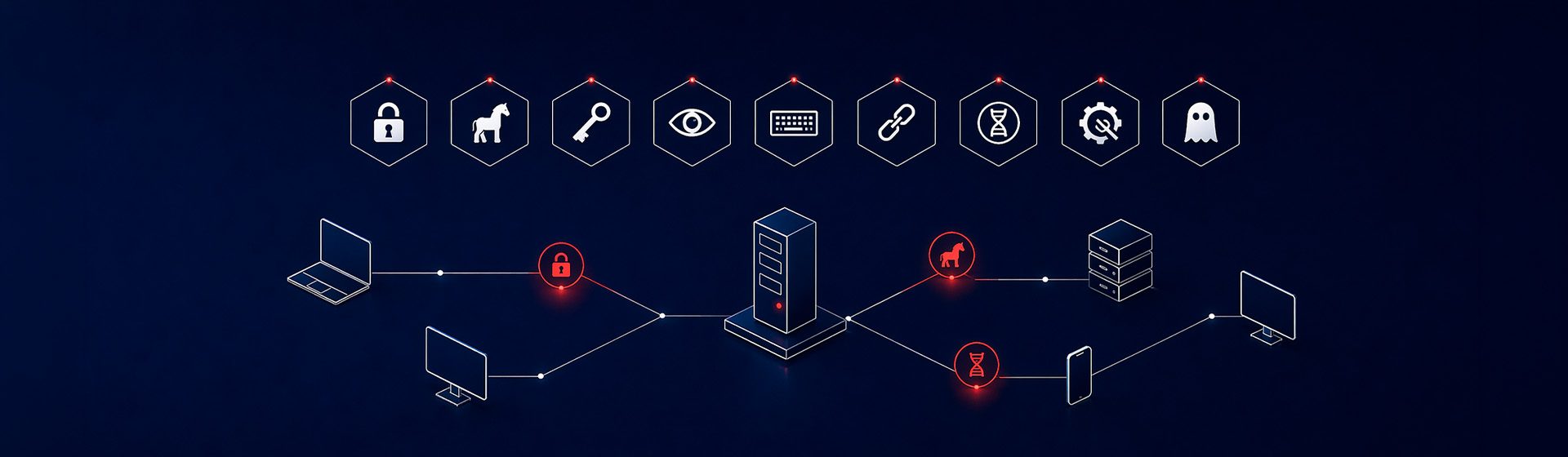
An employee opens a PDF that appears to come from a regular supplier. Nothing looks unusual. Three weeks later, the company discovers that someone has been inside for twenty-one days reading emails, copying databases and waiting for the right moment to demand a ransom. It was not just “a virus”. It was a remote access trojan —a RAT— hidden inside an invoice.
Malware can combine techniques and affect devices, identities and data. Antivirus, EDR, network controls and monitoring provide different, complementary capabilities. No tool guarantees detection or prevention of every attack; configuration, coverage and response also matter.
This guide presents nine malware categories, signals worth investigating and measures that can reduce their impact.
What is malware (and why the word can be misleading)
Malware is short for malicious software: any program, script or code designed to damage, steal, spy or take control of a device without the owner’s permission. It is an umbrella term. It includes viruses, worms, trojans, ransomware, spyware, keyloggers, rootkits, bots, infostealers, malicious adware and fileless malware.
The problem with saying just “malware” is that it does not tell you how it got in or how it behaves. And without that, you cannot defend yourself. Calling ransomware or an infostealer “malware” is like calling both flu and cancer “illness”: technically correct, operationally useless.
"ANTIVIRUS IS NOT THE SAME AS ANTI-MALWARE.
MODERN MALWARE IS NOT JUST VIRUSES."
The 9 types of malware you need to know
This is a practical selection of categories, not a statistical impact ranking. Some overlap, and a single attack may use several.
Ransomware
Ransomware may encrypt files and demand payment. Some campaigns combine encryption and data theft, and some use affiliates through a service model. Entry routes and time to impact vary. Prevention, detection, isolated backups and recovery should form a coordinated plan.
Trojans — including RATs
Malware that appears to be legitimate software or content and may open backdoors, steal data or install other payloads. RATs provide unauthorised remote access. Detection depends on the variant, configuration and controls; no universal percentage compares all antivirus products with all EDR products.
Infostealers
Malware specialised in stealing credentials, session cookies and other browser data. A stolen session may allow access without reauthentication while it remains valid and the service does not block it. This does not mean every MFA mechanism can always be bypassed. MITRE describes session-cookie abuse.
Spyware
Spy software that collects information without permission: what you type, which websites you visit, which documents you open, which calls you make. It ranges from advanced spyware such as Pegasus to low-cost commercial variants sold to companies to “monitor employees”. Unlike an infostealer, spyware monitors continuously instead of performing one quick extraction. It is detectable through anomalous network behaviour, such as constant uploads to unusual IPs.
Keyloggers
Keyloggers record keystrokes and may be software or physical devices. Device inspection and monitoring can help detect them, but EDR cannot guarantee identifying every keylogger, particularly hardware outside its telemetry.
Worms
Worms replicate and can spread without a further user action. Patching and segmentation reduce opportunities to spread. Separate VLANs alone are insufficient: traffic between segments, permissions, routes and exceptions must also be controlled.
Computer viruses
A virus embeds malicious code in other files and may replicate when they run. Antivirus products detect many known variants and some new ones, but no product guarantees detection of all viruses. Risk depends on the environment and exposure.
Rootkits
Rootkits seek to hide malicious activity and may affect highly privileged system components. They complicate detection, but are not necessarily invisible. Investigation may require trusted tools and an independent environment, and sometimes rebuilding the system.
Fileless malware
Fileless covers techniques that execute parts of an attack in memory or through legitimate tools. Some stages may still use files. Modern antivirus can inspect scripts, memory and behaviour; Microsoft documents these capabilities through AMSI. Source. Restrictions should fit operational needs and the relevant controls.
Bots, botnets, malicious adware, cryptojacking and wipers. There are more categories than can fit in a useful list. Bots and botnets are infrastructure: infected machines added to an attacker-controlled network, often for DDoS or spam. Malicious adware and cryptojacking usually enter through unreliable installers. Wipers erase data without demanding ransom; they are used for sabotage, not business. They are real, but they are not usually the first operational concern for an average company today.
How malware enters a company
These six routes help organise an exposure review. They do not represent a universal proportion of infections or an exhaustive list.
| Entry route | What it exploits | Layer that stops it |
|---|---|---|
| Email phishing | Malicious attachments or links. A user clicks. | Advanced filtering + training + MFA |
| Exposed RDP / VPN | Weak or stolen credentials, lack of MFA | Mandatory MFA, VPN without direct RDP, minimal exposure |
| Unpatched vulnerability | Exchange, Fortinet, Cisco, browser or CMS plugin | Vulnerability management + prioritised patching (EPSS) |
| Malicious website or drive-by | User visits compromised site or malvertising | DNS filtering + EDR + updated browser |
| Pirated software / cracks | Trojanised installers of “free” software | Controlled software policy + legal licences |
| Supply chain | Compromised supplier or malicious signed update | SIEM monitoring + least privilege |
Both phishing and exposed remote services can lead to serious incidents. Their impact depends on the access obtained and subsequent controls, not solely on the initial entry route.
Signs that malware is inside your network
The following signals warrant investigation, but may also have legitimate causes or result from technical faults. Correlate them with context and other evidence before concluding that malware is present.
Connections to unusual IPs
Connections to unexpected or newly registered destinations may warrant review. IP geolocation alone does not identify an attack. Network logs and correlation can help investigation.
Suspicious PowerShell or scripts
Encoded parameters, unexpected commands and new scheduled tasks can be useful indicators. They also occur in legitimate administration: review origin, user, process and purpose before attributing them to malware.
Accounts with anomalous use
Logins outside normal patterns or unexpected privilege changes require context. Detection depends on identity data, rules and the coverage of the available tools.
Processes you do not recognise
Binaries running from %AppData%, %Temp% or odd paths, newly created services, Word or Excel spawning cmd.exe. All of this is detectable and should alert.
Exfiltration: large uploads
An unusual transfer may indicate exfiltration, but may also be a backup or another legitimate operation. Investigate the process, destination and authorisation; it does not by itself prove that ransomware is about to encrypt data.
Antivirus or EDR disabled
Loss of antivirus or EDR telemetry requires prompt investigation. It may result from tampering, connectivity problems or an agent fault. Assess the risk and follow the response procedure without treating that signal alone as confirmed infection.
External contacts warning you about spam from you
Suspicious messages may come from a compromised account or a spoofed sender. Review headers, sessions and logs; if compromise is confirmed, revoke sessions and apply the planned recovery measures.
DOWNLOAD THE EARLY-DETECTION CHECKLIST
We have prepared a four-page PDF checklist with signals your system administrators can review. It supports an initial review, rather than certifying that a device is malware-free. It is based on incidents we have seen during the last year.
How to defend your company against malware
No single layer stops everything. Combined controls reduce exposure and support response, but residual risk depends on implementation and the environment. Prioritise measures through an assessment of the case.
Complementary antivirus and EDR/XDR
Antivirus can include signatures, heuristics and behavioural analysis. EDR adds endpoint telemetry, investigation and response; actual capabilities depend on the product and licence. There is no fixed detection rate that universally separates the categories. Microsoft documents behavioural and memory inspection in its antivirus.
Mandatory MFA everywhere
Prioritise MFA for email, remote access and privileged accounts, preferably phishing-resistant where feasible. Record technical exceptions and apply compensating measures. Missing MFA increases exposure, but does not explain a fixed percentage of incidents or guarantee that ransomware will occur.
Immutable and verified backup
Maintain isolated or immutable backups with separate credentials and test restoration against system criticality and recovery objectives. Check the actual scope of immutability and retention; an existing but untested backup does not guarantee successful recovery.
Network segmentation
VLANs separating IT, OT, production, servers and guests. An incident starting on an admin PC should not reach the file server or ERP without crossing an internal firewall.
Vulnerability management
Maintain an inventory and prioritise vulnerability remediation by asset criticality, exposure, known exploitation and severity. EPSS and CVSS provide information, but do not replace context or vendor guidance.
Training and drills
Use authorised training and exercises with clear objectives, periodic reviews and comparable metrics. Use the results to improve processes and training without promising a universal reduction in clicks or timetable.
24/7 monitoring (SOC or MDR)
Assign responsibility for reviewing and handling alerts, including out-of-hours periods required by the risk. If buying a 24/7 SOC or MDR service, confirm coverage, response times, exclusions and authorised actions in writing.
Primary sources: CISA StopRansomware · NIST SP 800-61r3 · Microsoft Defender for Business.
FAQs
about types of malware
What is the difference between a virus and malware?
Malware is the umbrella term for any malicious software. A virus is one specific type of malware: the kind that attaches to legitimate files and replicates when they are run. Every virus is malware; not every malware is a virus.
Does antivirus protect me from ransomware?
An updated, properly configured antivirus can detect or block ransomware, but not every attack. Combine it with access controls, protected backups, segmentation and investigation and response capabilities appropriate to the risk. EDR can add capabilities, but does not guarantee total protection either.
What is an infostealer and why is it so dangerous?
An infostealer steals data such as credentials and session cookies. If a stolen session remains valid and reusable, an attacker may gain access without reauthentication. The outcome depends on the service's controls; it does not mean every MFA method always fails.
How can malware enter without anyone clicking?
Through unpatched vulnerabilities in exposed services such as Exchange, SSL VPNs or management panels; through supply chain attacks; or through credentials stolen in a previous incident.
Is Microsoft Defender enough?
Distinguish Microsoft Defender Antivirus from the products and plans that add EDR capabilities. Defender for Business includes EDR; Defender for Endpoint capabilities depend on the plan. Review licensing, configuration, coverage and alert ownership before deciding whether the solution is sufficient for your risk.
How long does an attacker wait before encrypting?
There is no fixed 3-to-21-day window for every attack. Encryption or data theft may happen quickly or after a longer period of access. Prepare detection and response without assuming that several days will always be available to act.
How do I know if my company is already infected?
Review unusual signals alongside logs and context. None confirms infection by itself. Depending on severity, a compromise investigation or incident-response team may be needed; preserve relevant evidence and follow the incident plan.
Does malware exist on Mac?
Yes. macOS can also be affected by malware, including information-stealing software. Keep it updated, control applications and permissions, and assess protection and monitoring needs. Whether to use EDR depends on risk and environment management, not just the operating system.
DO YOU WANT TO KNOW WHETHER YOUR COMPANY HAS SECURITY GAPS?
Outdated antivirus, MFA not applied to email, a firewall without internal segmentation. The gaps that malware uses tend to be the same. If you want to know where your company stands, we can run a no-obligation diagnosis: we review the seven key layers and tell you where to start.
Team in Palma, no outsourcing.